AgentSight Integrations
AgentSight observes Agents without being wired into them, and it shows data from the other ANOLISA components when they happen to be installed. Nothing on this page is required to use AgentSight.
Supported Agents
Any process matched by a discovery rule is traced. The shipped rule set (31 rules) covers:
| Agent | Reported name |
|---|---|
| cosh (Copilot Shell) | Cosh |
cosh-ng (cosh-shell, cosh-core, cosh-cli) | CoshNG |
| Claude Code | Claude |
| Codex CLI | Codex |
| Qwen Code | QwenCode |
| OpenClaw (gateway) | OpenClaw |
| Hermes | Hermes |
| AgentScope | AgentScope |
| Runloop Node server | Runloop |
Anything else works too — add a rule, as described in Agent discovery rules. Integration details worth knowing:
- Claude Agent SDK trajectories use the Claude Code JSONL converter. Standard
~/.claude/projectsand inheritedCLAUDE_CONFIG_DIRlocations are automatic. If SDK options set the config only for the CLI subprocess, expose the same variable to AgentSight. For one.claudeper tenant workspace, add the workspace parent tofeatures.trajectory_collection.scan_dirs; bounded nested discovery labels those sessions asclaude-coderather than Qoder. - OpenClaw is observed through its
openclaw-gatewaydaemon, not the client. If Token data is missing, check that the client actually reaches the gateway. - Codex CLI statically links its TLS library, so AgentSight falls back to byte-pattern matching
and a per-version offset table. A brand-new Codex release may need a refreshed entry in
codex_offsets. - Gemini CLI trajectories are collected from the session files under
~/.gemini/tmp/<project>/chats/session-*.jsonl, no configuration needed. Project names come from each project directory's.project_rootmarker. The collector replays the CLI's correction records ($rewindTo,$patch,$set) before converting, so a collected trajectory matches the conversation the CLI itself would resume; sub-agent transcripts nested under the parent session id are collected as sub-agent trajectories. - Hermes trajectories are also available without eBPF. The trajectory collector opens
$HERMES_HOME/state.dbread-only, converts active messages, reasoning, tool calls, tool results, and session Token totals to ATIF v1.7, and follows committed SQLite WAL updates. Whenscan_dirsis set, include either the Hermes home directory or thestate.dbpath explicitly. Malformed session rows or messages are logged and skipped per session; healthy sessions continue. Unchanged sessions are checked using metadata only, without loading their stored ATIF content. Their per-session fingerprints are stored separately from trajectory payloads, so capacity eviction does not cause unchanged sessions to be reingested. New source messages still trigger collection. Payload and scan state are saved atomically; state expires with source-message age under the configured retention policy or when the source database disappears.
Hermes allows caller-defined session IDs. To keep multiple databases independent, the collector
uses a stable hermes:<SHA256> ID derived from the canonical database path and original session ID.
The database row and ATIF session_id agree. Use this collected ID for trajectory APIs; the original
ID is retained in extra.hermes_session_id for Hermes API and external correlation. Parent references
use the same namespace, with the original parent in extra.hermes_parent_session_id. These IDs are
not automatically joined to eBPF sessions that use the original ID. The database path itself is not
embedded in the exported ID or extra metadata.
Keep each source database mounted at a stable path across collector restarts. Path aliases pointing to the same canonical location share one identity; moving a database to a different canonical path or mounting a copy elsewhere creates a separate collected identity. Earlier preview builds stored raw Hermes IDs: use a fresh output database when comparing previews, or expect old raw-ID rows to coexist until retention cleanup. Source Hermes databases are never modified by this transition.
Tokenless: Token savings
With Tokenless installed, AgentSight shows how many Tokens compression actually saved — no configuration on either side:
- the Token Savings page compares actual consumption against the baseline, by optimization type;
- the
SAVED TOKENScolumn appears next to each session on the Agent Observability page; - the Trajectory Viewer shows original versus optimized Tokens for the loaded session;
agentsight summaryincludes a savings line;GET /api/token-savingsexposes the same numbers.
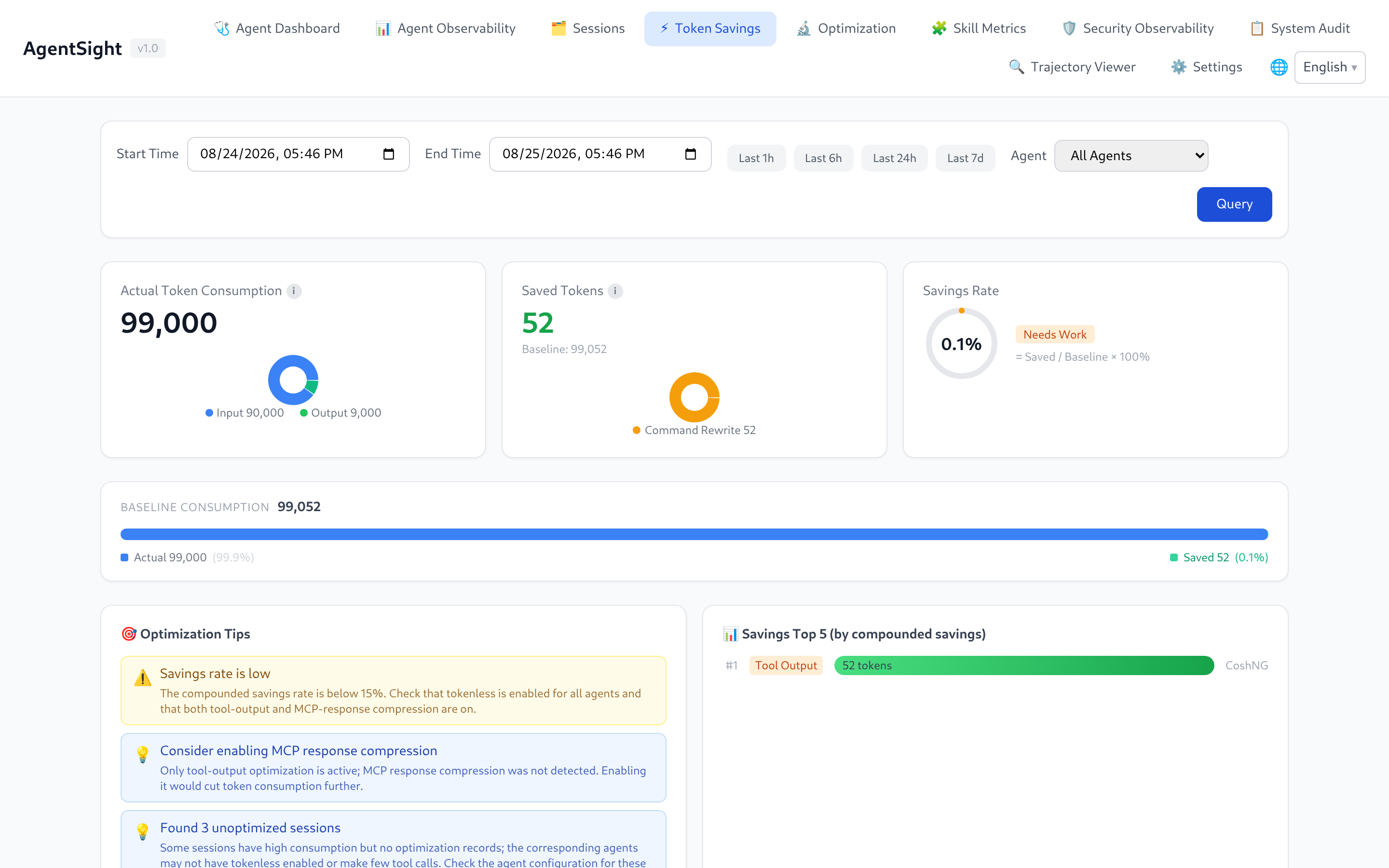
The page reads Tokenless's own statistics database, so numbers appear only after Tokenless has optimized something. A savings figure of 0 usually means Tokenless is installed but not active for the Agent that produced those sessions.
Savings association also requires AgentSight to capture and parse the corresponding output tool-call ID. Non-SSE HTTP/1.1 responses split across TLS reads are assembled using Content-Length or chunked framing before usage and tool calls are extracted. Oversized responses are discarded with a collector warning. Incomplete responses, including close-delimited responses without Content-Length or chunked framing, cannot supply complete usage or tool-call IDs; Tokenless stats can therefore remain unassociated. When SQLite storage is enabled, idle calls retain their request as pending evidence for interruption detection and can still complete if the response resumes. Response buffering remains bounded by the connection capacity and per-connection body limit.
agent-sec-core: security observability and audit
When agent-sec-core is installed, two more Dashboard pages appear:
| Page | Content |
|---|---|
| Security Observability | Prompt-injection, PII, and code-scan verdicts per session and per run |
| System Audit | Audit events aggregated into cases you can review, and contain when the enforcer is present |
AgentSight detects the component by its daemon socket or its CLI binary, so the pages stay reachable even while the daemon restarts.
One side effect worth knowing: agent-sec-core and Tokenless hooks run as short-lived helper
processes, and AgentSight records those too. They can dominate agentsight audit output — filter
them out with repeated --exclude:
sudo agentsight audit --last 1 --exclude agent-sec-cli --exclude observability_hook.py
agentsight-enforcer: risk enforcement
agentsight-enforcer is the privileged daemon that can block risky Agent actions. It ships with the
package and is started by agentsight-enforcer.service. When its socket
(/run/agentsight/enforcer.sock) is missing, serve logs:
AgentSight enforcement unavailable: enforcer I/O failed: No such file or directory (os error 2)
Capture and analysis are unaffected; only the Risk Enforcement page and the
/api/enforcement/* endpoints disappear. Start the unit, or build with make build-all if you
built from source.
The daemon itself logs to the journal — engine startup, socket bind, policy apply outcomes (including rollback detail when a kernel step fails), and poller errors:
$ sudo journalctl -u agentsight-enforcer
[INFO  agentsight_enforcer] agentsight-enforcer listening on /run/agentsight/enforcer.sock
The default level is info; add Environment=RUST_LOG=debug to the unit for verbose output.
Blocking also depends on the engine's hook budget: a block rule can only deny an operation when
the matching BPF LSM hook was reserved at engine start and BPF LSM is active on the kernel
(bpf listed in /sys/kernel/security/lsm). When a block rule matches on a backend that cannot
deny that operation — for example a block connect rule while the enforce_socket_connect hook is
not attached — the engine still reports the match as a violation with effect=block and
blocked=false. Treat such degraded reports as a signal that the policy cannot actually deny;
check the engine profile (ACTPLANE_HOOK_PROFILE / ACTPLANE_PINNED_PROFILE) and the kernel's LSM
configuration.
Protocol v5 adds a versioned file_protection_policy payload, mutually exclusive with policy_dsl.
Current backends reject structured policies without changing bindings; the new file-protection
capabilities remain false. Existing DSL semantics are retained, but v4 clients must upgrade with
the enforcer because protocol v4 frames are rejected.
cosh: ask in natural language
AgentSight ships a conversational Skill for cosh, so Token and audit questions can be asked in the terminal instead of through the CLI:
- "How many Tokens did I use today?"
- "Show me today's LLM calls"
- "Were there any interruptions in the last hour?"
Prometheus and Grafana
curl -s http://127.0.0.1:7396/metrics
/metrics is loopback-only by design. Scrape it with a node-local Prometheus agent (or a local
reverse proxy) using the counters agentsight_token_input_total, agentsight_token_output_total,
agentsight_token_total_total, and agentsight_llm_requests_total, all labelled by agent.
For richer panels, poll the JSON API instead — /api/timeseries for Token trends,
/api/metrics/latency for latency percentiles, /api/interruptions/count for open problems.
Trajectories for offline analysis
GET /api/export/atif/session/{id} returns an ATIF v1.7 trajectory containing prompts, tool calls,
results, and Token totals. Use it to feed evaluation pipelines, attach a reproduction to a bug
report, or import the session into another AgentSight instance through the Trajectory Viewer.
Related pages
- Configuration — add rules for your own Agent
- Dashboard guide — which pages appear when
- Data and storage — API details
Record statistics through the API
With tokenless_api configured, authenticated POST /api/tokenless/refresh accepts
{"session_id":"source-session"}, {"tool_use_id":"captured-tool-id"}, or {} to record one source page (100 records). Unfiltered replies include an optional
string next_before_id; pass {"before_id":"42"} to record the next page. This is an ordinary
query parameter, without a persisted checkpoint or restart-recovery guarantee. It records a
bounded query (at most 1,000 records / 8 MiB) atomically. An oversized query fails without
saving a partial result; narrow the filter. Refresh requires an AgentSight credential,
even from loopback. GET /api/tokenless/records lists saved metadata with optional
start_ns, end_ns, session_id, tool_use_id, and limit (1–100); the default window
is the last 24 hours. Network/query failures are explicit, and saved records remain readable.
Original fields are preserved. agentsight_session_id is populated only when a captured
tool-call ID uniquely matches a local session; missing or ambiguous associations remain null.
Saved lists also accept before_cache_id for descending local-ID pagination and return
next_before_cache_id. GET /api/tokenless/records/{cache_id}?include_content=true requests
full content; omitting the flag returns metadata. Configured API copies supply the existing
savings endpoints, excluding DryRun/unknown modes and avoiding duplicate local-database accounting.
The existing GET /api/token-savings and GET /api/token-savings/session/{id} refresh metadata
for their captured tool-call IDs before calculating results. No separate refresh request is needed
for these views. They require the existing AgentSight credential when an API is configured,
including loopback requests. The query deduplicates IDs and shares a 5-second, 1000-record/request,
8-MiB budget across source requests. A failed or oversized refresh returns an error without saving
a partial batch or presenting cached rows as current. Source records absent from this response are
excluded from current totals; saved records remain available through the records API. Without
tokenless_api, the existing local-database behavior is unchanged.
Historical call IDs remain available for compounding calculations. Source lookup batches at most 128 IDs per request, so a long session with few matching records can complete without discarding earlier savings. All batches and their pages share the same recording budget. Saved metadata lists also require the existing AgentSight credential, including on loopback.
The API-backed savings path requires the batch POST endpoint; upgrade AgentSight and the Tokenless query service together. Existing single-filter GET queries remain available.